Zet - How do I fix the flickering on the intel macbook?
How do I fix the flickering on the intel macbook?
Try resetting the NVRAM and the SMC:
Reset NVRAM on your Mac - Apple Support
If you’re not using a Mac with Apple silicon, you’re using an Intel-based Mac.
How to reset NVRAM

- Shut down your Mac.
- Turn on your Mac, then immediately press and hold these four keys together: Option, Command, P, R.
- Release the keys after about 20 seconds, during which your Mac might appear to restart. For example, you might hear a startup sound more than once, or see the Apple logo more than once.
- When your Mac finishes starting up, you might need to adjust any system settings that were reset.
Reset the SMC of your Mac - Apple Support
-
Shut down your Mac.
-
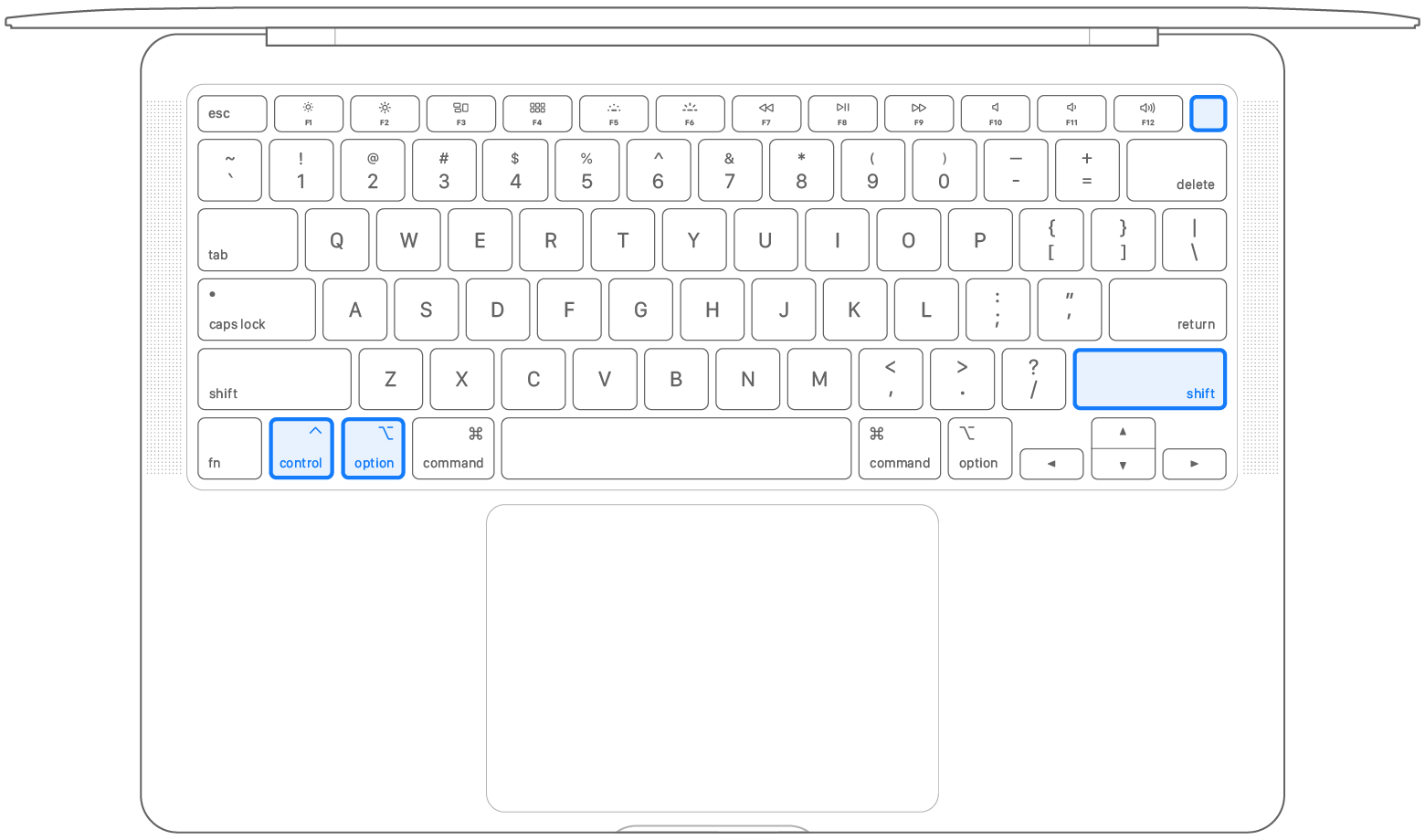
On your built-in keyboard, press and hold all of the following keys. Your Mac might turn on.
-
Control
 on the left side of your keyboard
 -
Option (Alt)
 on the left side of your keyboard
 -
Shift
 on the right side of your keyboard
-
-
Keep holding all three keys for 7 seconds, then press and hold the power button as well. If your Mac is on, it will turn off as you hold the keys.
-
Keep holding all four keys for another 7 seconds, then release them.
-
Wait a few seconds, then press the power button to turn on your Mac.
#macbook